Ghost Cheats
Sign in
Product status:Undetected

Ghost DeadLock

Private software for Deadlock from the Ghost Cheats project, featuring a full suite of functions: ESP, Aimbot, and Wallhack.

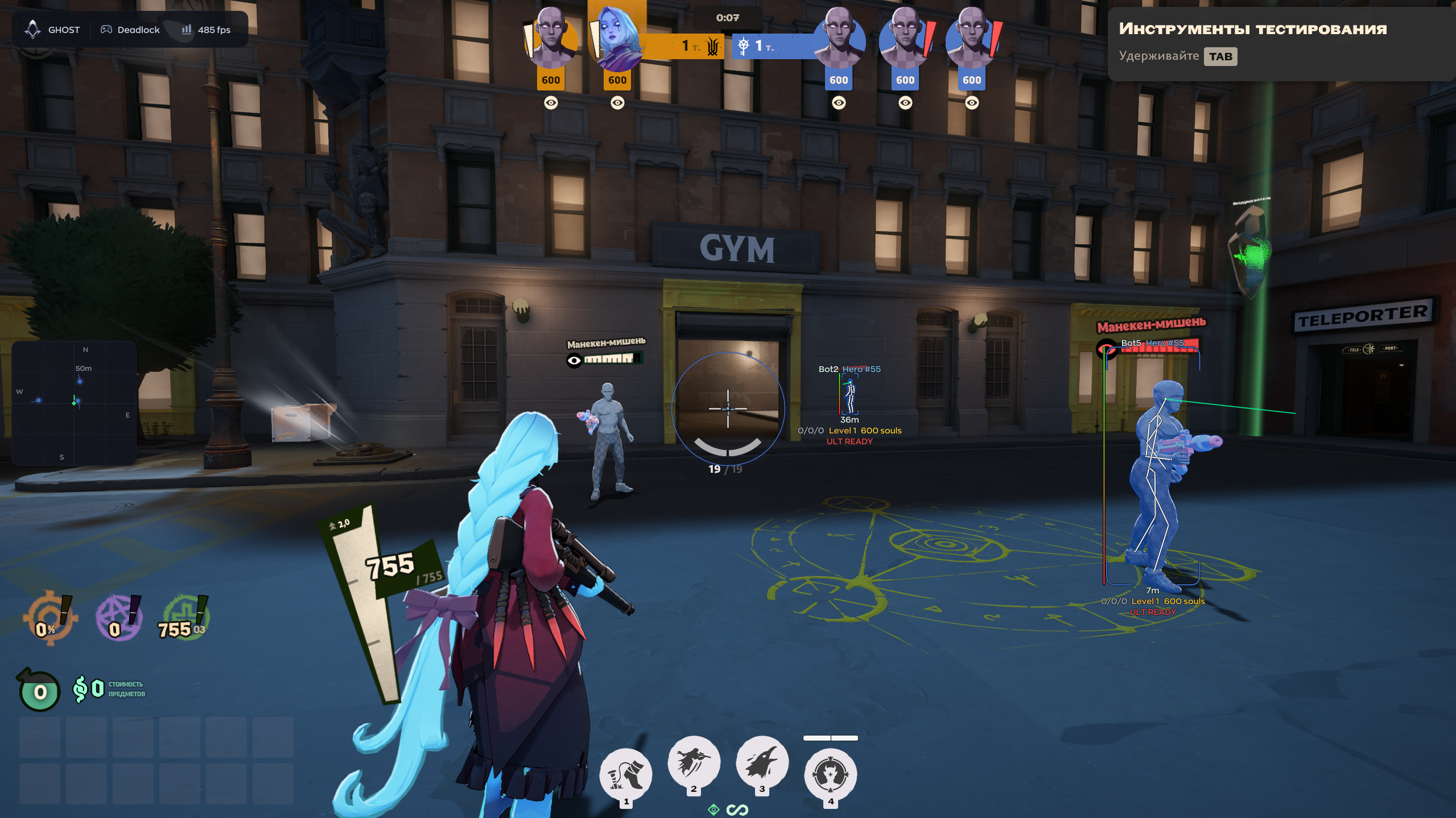
VISUALS - ESP

PLAYERS
Enabled
Visible Checkrisk!
Weapon
Distance
100m
Armor
Skeleton
BOTS
Enabled
Visible Check
Weapon
Distance
100m
Armor
ZOMBIES
Enabled
VEHICLES
Enabledrisk!
Distance
100m
image_2026-11-03_15-29-04.webp

Choose plan

Pick your duration — instant activation, updates and 24/7 support already included.

Regular plan
$2.00−10%
$1.801 Day

A full day of access. A clean way to test the cheat on your own rig and in your own games before committing to a longer plan.

Regular plan
$11.00−15%
$9.3530 Day

The best value per day — built for players who are on daily.

Plan discount−15% ($1.65)
Quantity1
Total$9.35

Sign in to unlock rank, referral and bonus discounts

Regular plan
$5.50−15%
$4.677 Day

A week with no limits. The sweet spot for evening and weekend sessions.

all about our product

A detailed look at the product: supported features, flexible settings and the system requirements for smooth, stable performance.

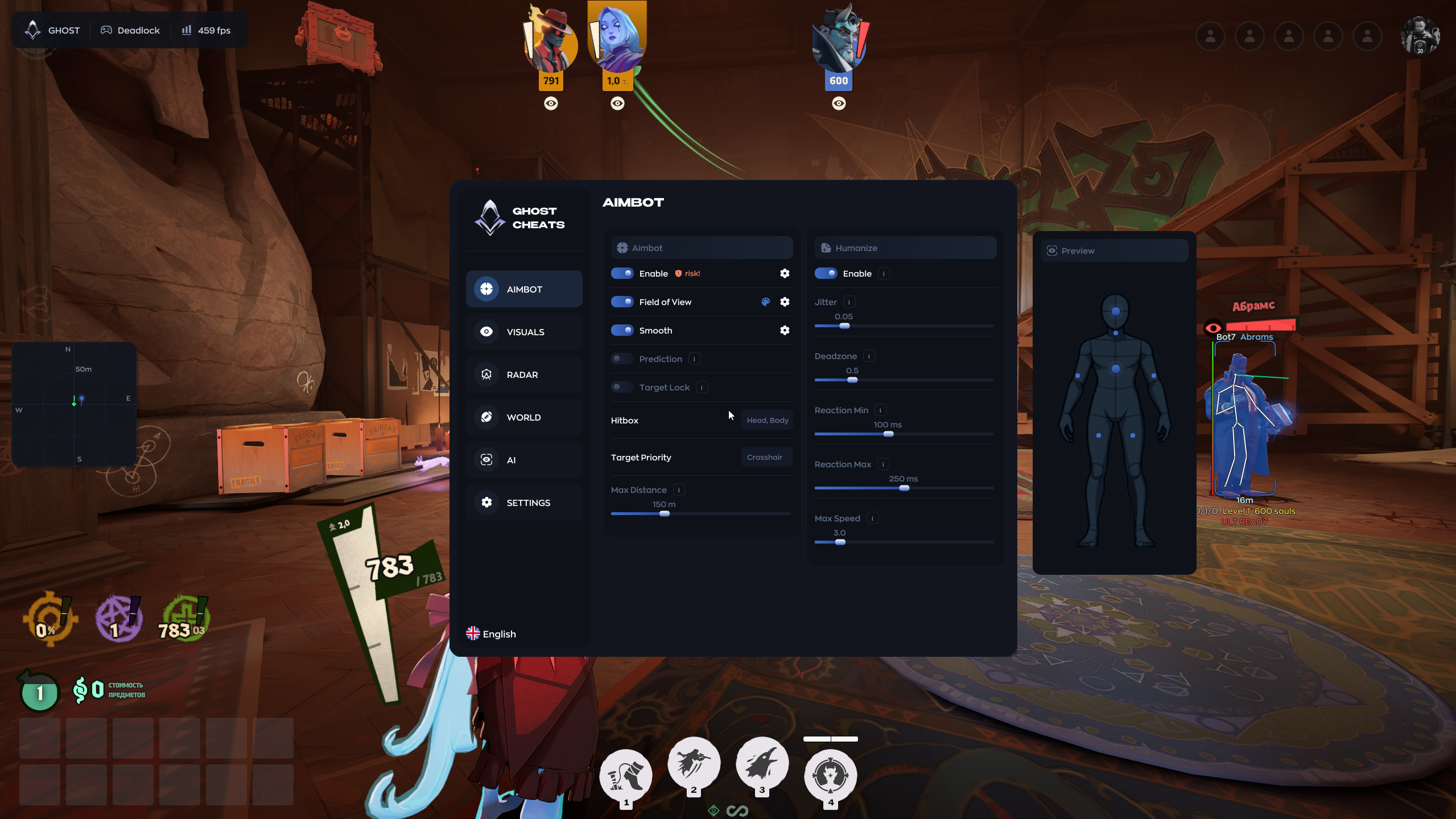
Enable (On / Off) — a toggle switch for the aimbot function.
Field of View — the radius/area around the crosshair within which the aimbot will lock onto a target.
Smooth — the speed at which the crosshair moves toward the target.
Prediction — calculates the target's movement and aims toward where the target is heading.
Target Lock — keeps the crosshair locked onto the selected target.
Hitbox — selection of the specific body part the aimbot will target (e.g., Head, Body).
Target Priority — selection of which target to prioritize.
Max Distance — the maximum distance beyond which the aimbot will not react to enemies.
Humanize — makes the aimbot’s behavior appear more natural by simulating human reaction times and mouse movements:
Enable — turns on the humanization feature.
Jitter — adds micro-oscillations (slight tremors) to the crosshair.
Deadzone — an area within which the aimbot will not make any adjustments to the crosshair.
Reaction Min / Max — a delay (in milliseconds) before the aimbot begins moving toward the target.
Max Speed ​​— a limit on the speed at which the camera (view) can rotate.
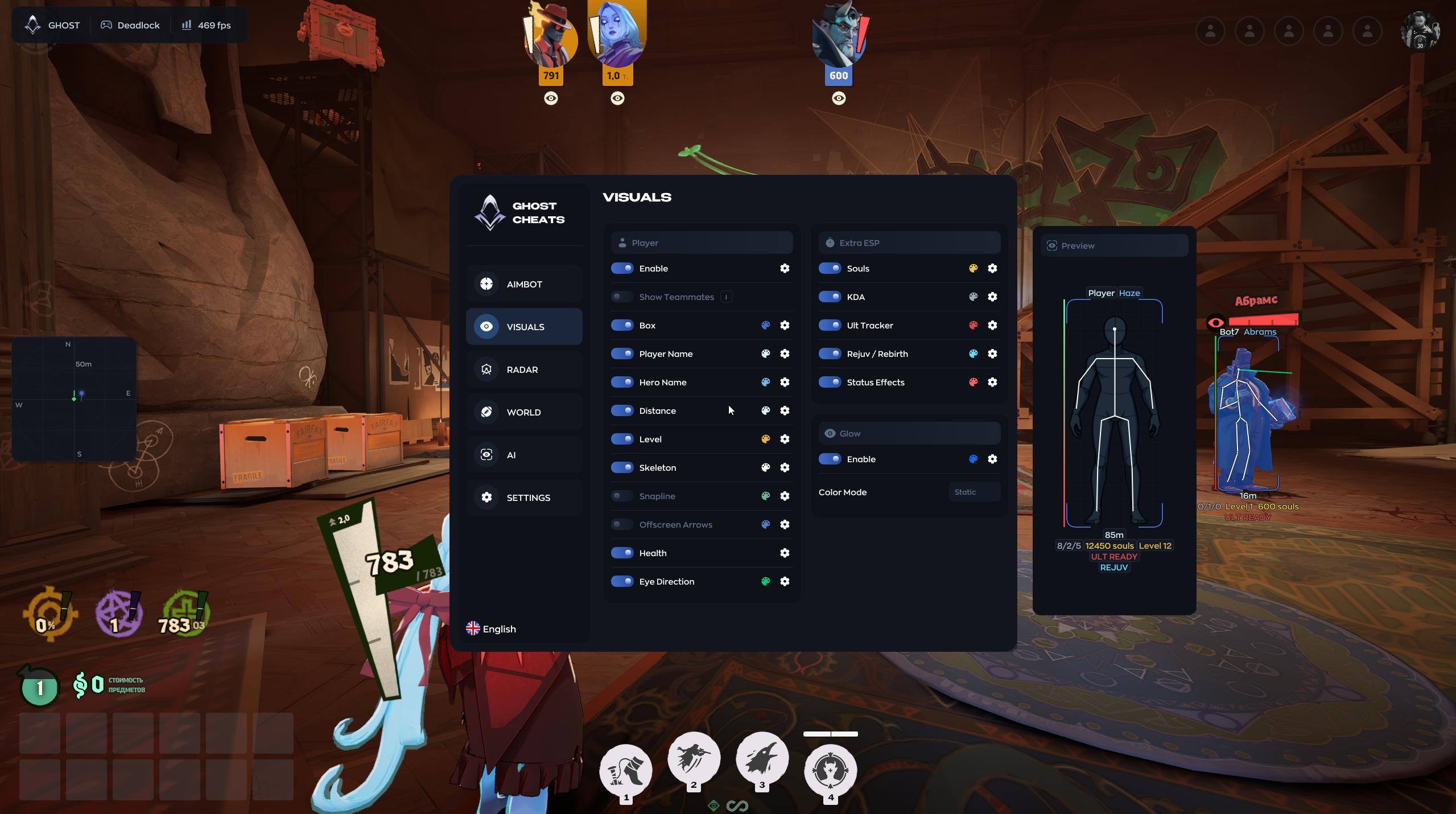
Player:
Enable — turns on player rendering.
Show Teammates — includes allies in the display.
Box — draws a rectangle around the player model.
Player Name — displays the player's nickname.
Hero Name — displays the character (hero) name.
Distance — shows the distance to the player.
Level — shows the player's level.
Skeleton — draws the character's skeleton (bones), allowing you to see their pose and animations through walls.
Snapline — draws a line from your character to the enemy.
Offscreen Arrows — displays arrows along the edges of the screen to indicate the location of enemies outside your field of view.
Health — shows the enemy's health bar.
Eye Direction — displays a line indicating where the enemy is looking.
Extra ESP:
Souls — shows the number of souls a player has.
KDA — displays kill/death/assist statistics.
Ult Tracker — tracks the readiness of an enemy's ultimate ability.
Rejuv / Rebirth — indicates the presence of specific buffs or resurrection capabilities.
Status Effects — displays the current status effects active on a player.
Glow:
Enable — turns on the glow effect for player models.
Color Mode — configures the glow color (static, team-based, etc.).
Preview — a window on the right that shows how your visual settings appear on a dummy model.
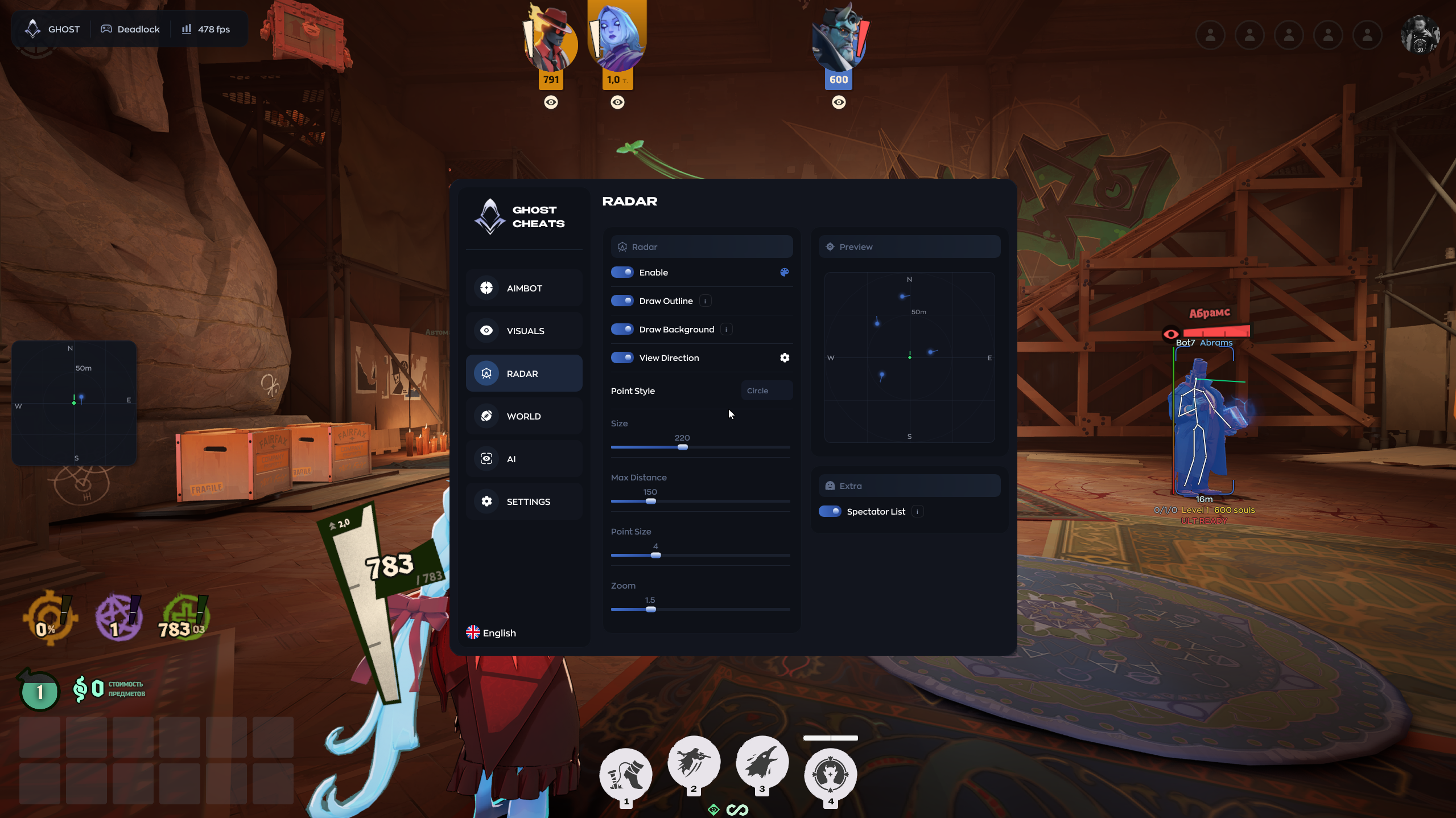
Radar:
Enable — turns on the mini-radar.
Draw Outline — adds an outline to the radar.
Draw Background — renders the background/map on the radar.
View Direction — displays your character's field-of-view cone on the radar.
Point Style — adjusts the appearance of the markers on the radar.
Size — sets the size of the radar window.
Max Distance — controls the scale of the radar.
Point Size — sets the size of player markers on the radar.
Zoom — adjusts the zoom level of the radar.
Extra:
Spectator List — shows who is currently spectating you.
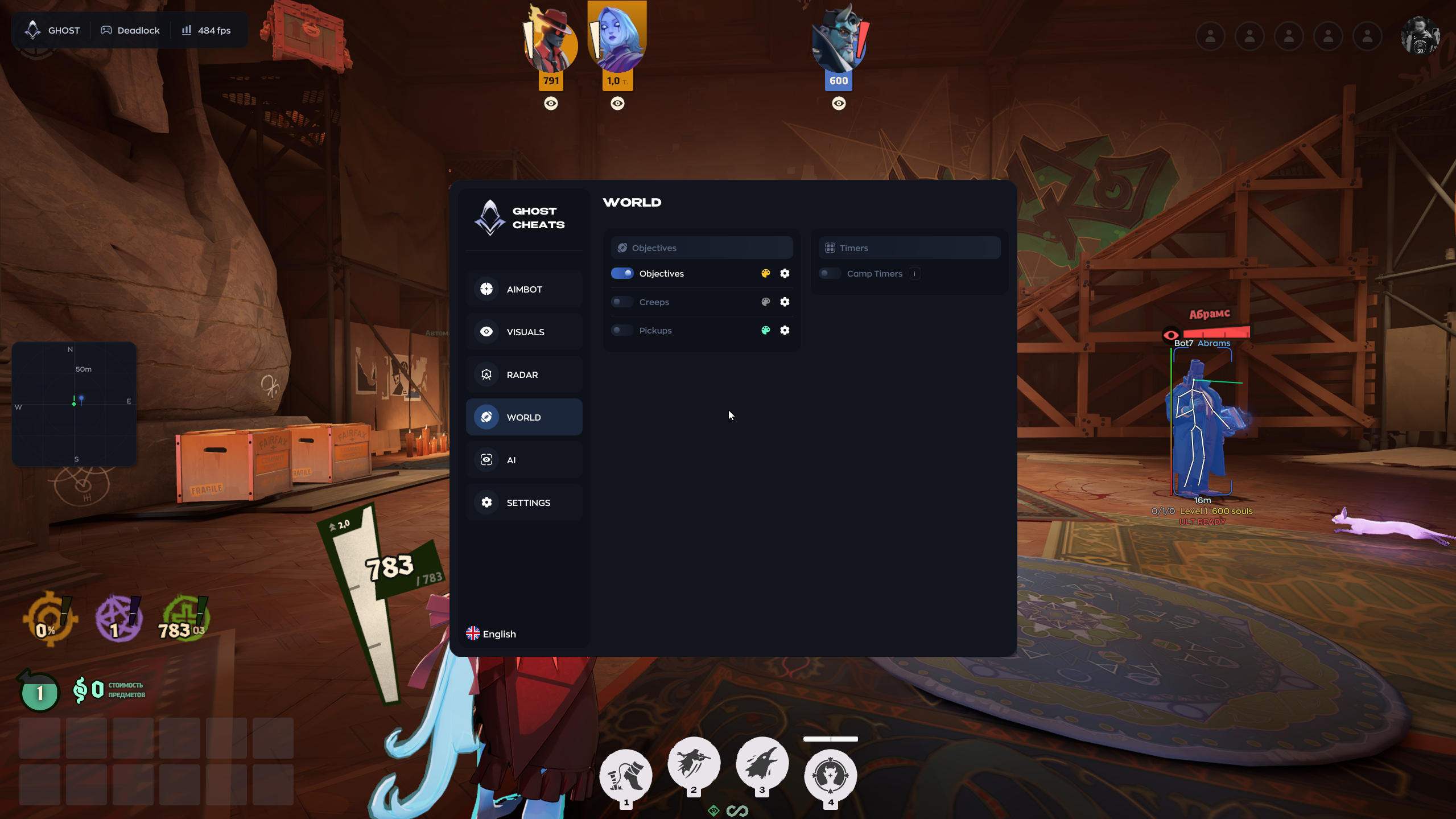
Objectives — marks important in-game objectives on the map (e.g., bosses, defensive turrets, guardians, etc.).
Creeps — highlights neutral mobs or standard enemy units.
Pickups — highlights various boosts, runes, loot crates, and other useful items on the map.
Camp Timers — respawn timers for neutral monsters/camps.
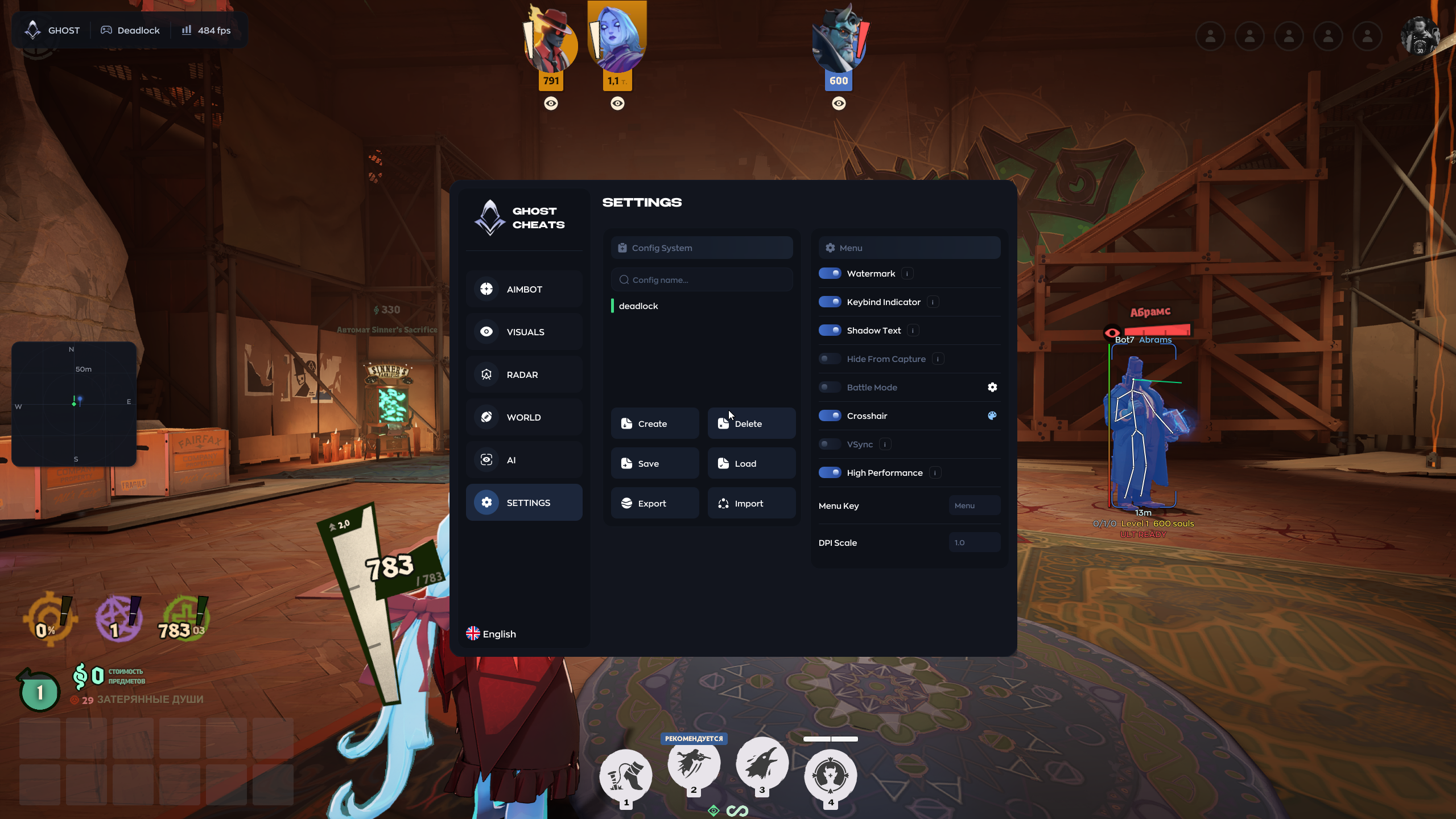
Create / Delete — create or delete a configuration.
Save / Load — save current settings or load previously saved ones.
Export / Import — export a configuration to a file or import one (to share settings with another user).
Watermark — displays a watermark/logo of the software on the screen.
Keybind Indicator — an indicator for the key used to open the menu.
Shadow Text — adds a shadow to the text within the menu.
Hide From Capture — hides the cheat menu during streaming or screen recording (e.g., in OBS or via screen capture).
Battle Mode — combat mode (hides unnecessary interface elements).
Crosshair — settings for enabling or configuring a custom crosshair.
VSync — vertical synchronization.
High Performance — a mode for high performance.
Menu Key — the key used to open this menu (default is Insert/Home).
DPI Scale — scales the menu interface according to the screen resolution.
Language — switches the interface language.

OUR REVIEWS

We value our reputation, and our reviews will prove it

No reviews yet

Be the first to rate this cheat — your review will help others decide

JOIN US

Learn more about our partners — we work everywhere and our team keeps growing.